Blog › Technique · 15 November 2026 · 5 min read
How to film your golf swing with your phone (and actually learn from it)
What you feel in your swing and what you really do rarely match. You think the club goes back on the inside and the video shows it outside. You think you turn your shoulders and they barely move. That is why filming yourself is one of the cheapest ways to improve: all you need is your phone and something to hold it.
Film your swing in slow motion without touching your iPhone.
CaddieStroke · 7 days free · iPhone only
Try it freeThe problem is that most swing videos are useless: the phone is tilted, too high, or the club is a blur right at impact. This guide shows you how to get it right in five minutes.
- What you need
- Filming from behind
- Filming face-on
- iPhone settings
- What to look for
- Common filming mistakes
1. What you need
- Your phone. Any recent iPhone can film in slow motion.
- A tripod or stand. A cheap one with a phone clip is fine. If you have nothing, lean the phone against your bag, as long as it doesn't move.
- Light. Daytime, with the sun behind you or to the side, never facing the camera.
You don't need anyone to film you. In fact, it's better if the phone is always in the same spot, so you can compare one swing with another.
2. Filming from behind (the most useful view)
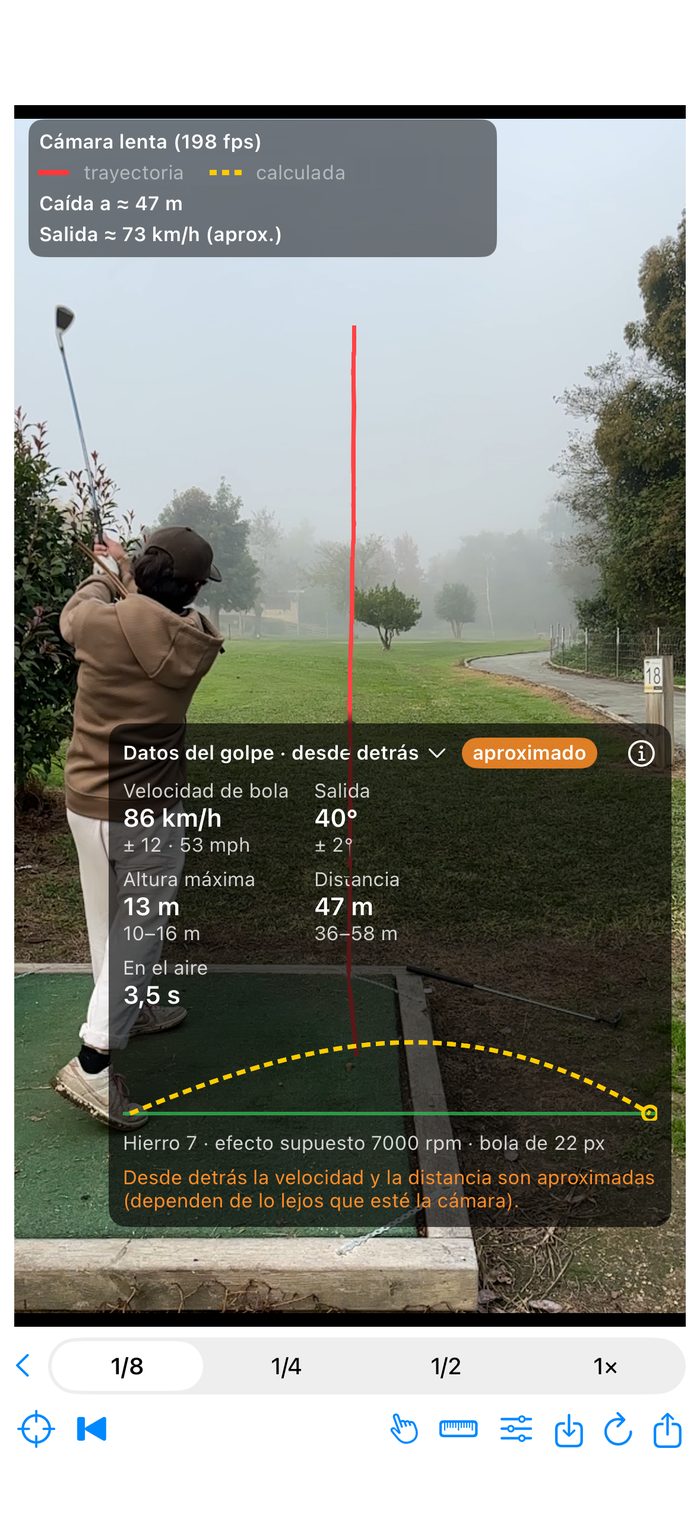
This is the view coaches use to check the swing plane: the path the club takes up and down.
- Position: behind you, on the line from the ball to the target. Picture a line from the ball to the flag: the phone goes on that line, but backwards.
- Height: the height of your hands at address, roughly hip height.
- Distance: about 3 to 4 metres (10 to 13 feet). Your whole body and the club at the top must fit in.
- Aim at: your hands, not the ball or your head.
A tip: lay a club on the ground at your feet, pointing at the target. In the video it will help you check your alignment.
3. Filming face-on
Face-on shows how your body moves: whether you sway, where the ball is in your stance and how your hands arrive at impact.
- Position: in front of you, facing you, level with the middle of your chest.
- Height: as from behind, at hand height.
- Distance: also 3 to 4 metres.
Ideally film both views, but if you can only do one, start with the view from behind.
4. iPhone settings
- Slow motion. In the Camera app, choose "Slo-mo". At normal speed the club is a smudge at impact. At 240 frames per second you see it clearly.
- Portrait. A golfer is taller than wide: portrait uses the whole frame.
- No zoom. Digital zoom loses quality. Move the tripod closer instead.
- Lock the focus. Press and hold on yourself on the screen until "AE/AF Lock" appears, so the focus doesn't jump when the club passes.
The trouble with the normal camera: you walk to the phone, press record, walk back to the ball, hit, walk back to the phone, stop it… and end up with a five-minute video for a one-second shot.
That's why we made CaddieStroke: put your iPhone on the tripod, control it with your voice, and the app hears the impact and keeps just that moment in slow motion. No touching the phone between shots.
Try CaddieStroke free
7-day free trial. iPhone only.
5. What to look for in the video
Don't try to fix everything at once. Watch the video in slow motion and focus on one thing at a time:
- Address. Are you aligned? Is your back straight or hunched? Many faults start here, before the club even moves.
- The top. From behind, does the club point roughly at the target or cross the line a lot?
- Impact. Is your head still in place or has it lifted? Are your hands ahead of the ball?
- Finish. Do you finish balanced, with your weight on your front foot, or fall back?
Pick the weakest point and work only on that for a week. Then film yourself again with the phone in the same spot and compare.
In CaddieStroke, the "How to improve" screen checks your posture at those four moments and tells you what to work on first, with tips from a catalogue written in advance. Everything is analysed on your iPhone: the video never leaves the phone.
6. Common filming mistakes
| Mistake | What happens | Fix |
|---|---|---|
| Phone too high | The swing looks flatter than it is | Lower it to hand height |
| Phone off the target line | The club seems to go outside (or inside) when it doesn't | Put it right on the ball–target line |
| Filming at normal speed | Impact is a blur | Use slow motion |
| Sun in the lens | You appear backlit and dark | Turn the tripod or move bays |
| Moving the phone each time | You can't compare one day with another | Mark the tripod spot (for example, two club lengths away) |
In short
Phone on a tripod, at hand height, 3 to 4 metres away, on the target line and in slow motion. That gives you a video you can actually learn from. And if you don't want to walk to the phone between shots, try CaddieStroke free for 7 days.
You might also like: golf club distances chart · golf courses with GPS in CaddieStroke · golf handicap calculator.