Blog › Gear · 16 November 2026 · 5 min read
Laser rangefinder, GPS watch or voice app: which one suits you?
Knowing your distance is what helps most when choosing a club. Today there are three ways to get it: point a laser, glance at a GPS watch or ask an app. Each has its place. Here are the pros and cons of each, straight up.
GPS distances on your iPhone, without buying a rangefinder.
CaddieStroke · 7 days free · iPhone only
Try it free1. Laser rangefinder
You point it at the flag, press, and get the exact distance to that point.
- Pros: very accurate to the flag and doesn't depend on maps or signal.
- Cons: you have to take it out, aim with a steady hand and see the flag. On blind holes or in fog it's not much use. It won't tell you the front or back of the green if you can't see those points. And it's one more gadget to carry and charge.
2. GPS watch
You wear it on your wrist and it shows the distance to the front, middle and back of the green.
- Pros: convenient, just turn your wrist. Works on blind holes.
- Cons: the screen is small and shows little of the hole. Many only give a few numbers. You have to remember to charge it, and good ones aren't cheap.
3. Phone app, and by voice
It uses your phone's GPS and the course map to give you the distance to the green and other points on the hole.
- Pros: no gadget to buy, a big screen, and you see the whole hole on the map: bunkers, water and green. You can keep your scorecard too.
- Cons: usually you have to take your phone out for every shot, unlock it and find the app. With gloves, sun or rain it's awkward and breaks your rhythm.
That's where an app you control by voice is different: leave the phone in your pocket or bag and just ask, for example through headphones. It answers out loud and you keep your eyes on the hole, as if you had a caddie.
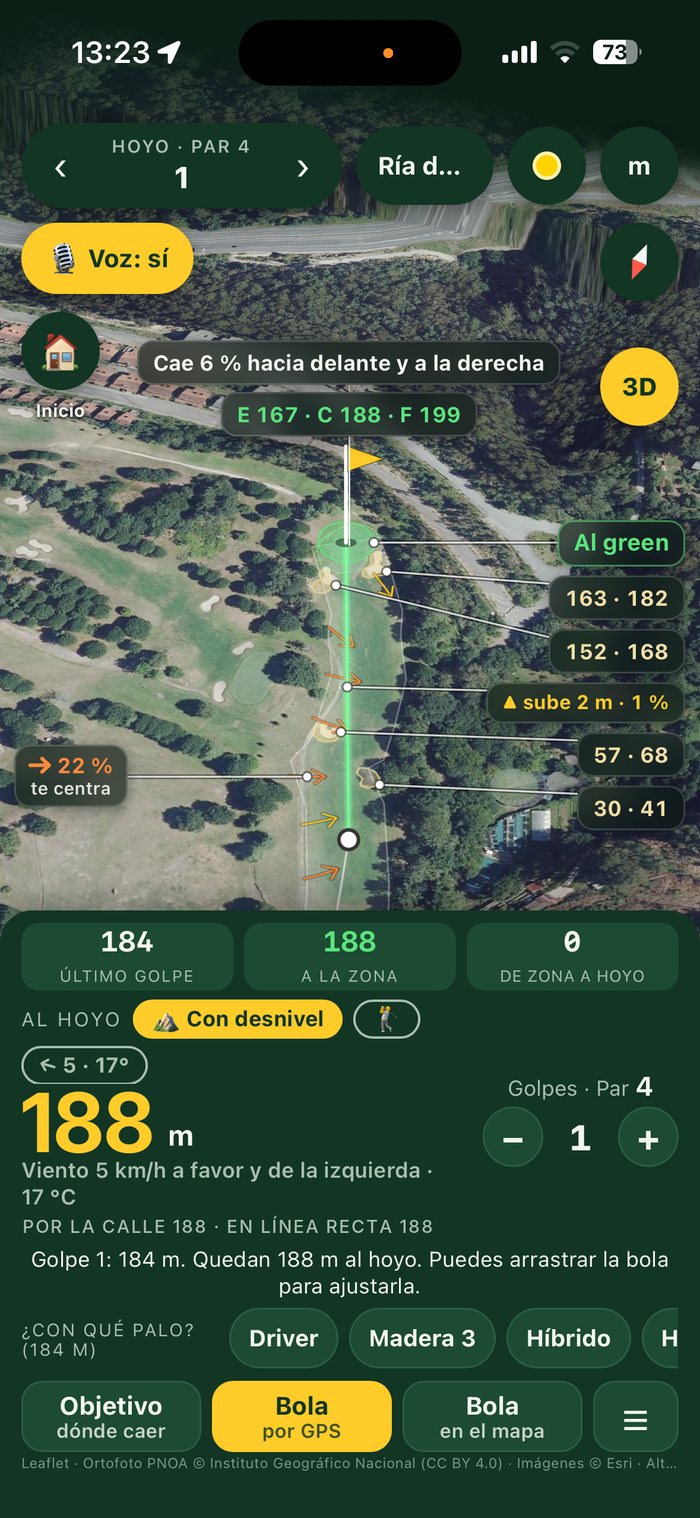
That's how CaddieStroke works. Ask by voice, with headphones too, and it tells you the distance to the green, how far the shot really plays with slope and wind, and which club to take. No phone in hand. There's a competition mode for tournaments.
And on the range it records your swing in slow motion without touching the phone. All in one app, no extra gadgets.
Try CaddieStroke free
7-day free trial. iPhone only.
4. Quick comparison
| Laser | GPS watch | Voice app | |
|---|---|---|---|
| Distance to the flag | Very accurate if you can see it | To the green (front, middle, back) | To the green and points on the map |
| Blind holes | Hard | Yes | Yes |
| See the whole hole | No | A little | Yes, on the map |
| Hands-free | No | Almost | Yes, by voice |
| Extra gadget | Yes | Yes | No, your phone |
| Allowed in competition | Yes, without slope | Yes, without slope | Yes, in competition mode |
For the rules in detail, see can you use a rangefinder in competition?
5. Which should I choose?
- If you mostly play the same flat course and want the exact distance to the flag, a laser does the job.
- If you want something handy on your wrist and don't mind seeing little of the hole, a watch.
- If you don't want to buy anything else, want to see the whole hole and would rather not take your phone out, a voice-controlled app.
Many golfers combine two: for example, the app to plan the hole and a laser for the final shot at the flag.
Before a competition, also work out your course handicap with our free handicap calculator, and check our golf courses with GPS.
In short
A laser is accurate but you have to aim; a watch is handy but shows little; an app shows everything but makes you take your phone out, unless you use it by voice. If you'd like to try the hands-free option, try CaddieStroke free for 7 days.
You might also like: rangefinders and the rules · golf club distances · golf courses with GPS.